Δ Quick Bridge for Windows 3.1.10 

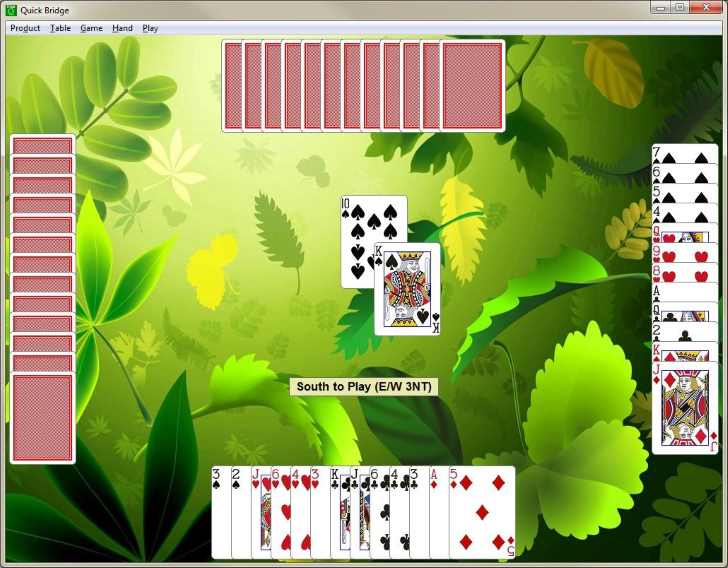
Sharpen your skills at the Bridge table with this fun, free and easy-to-use game of Contract Bridge. You play for South and North (We) while the computer plays for East and West (They).

Download "Quick Bridge"

NEW! Bridge Scoring App

Uses the Standard American Bidding system with Stayman and Blackwood conventions. Replay the last hand or Redeal the current hand. Includes a pop-up score sheet that keeps score for you.


Enjoying this game? Consider a donation to show your appreciation for my work. Thanks

Here is a list of planned, in progress and completed stories (features and improvements) for this product. Let me know what you would like to see added to the list or if you have any comments. The "Rank" of a story is a combination of requests and donations from user's like you. The higher the rank the more likely it will get done.

New Stories
(most requested at the top)
Story Description Status Version Rank
Option to Review Hands and Tricks: Add an option to review all the hands and tricks after the play is complete. None 3.?.? 25
Separate Dummy Hand into Suits: Visually separate the dummy hand into piles based on suit. This will present a more traditional and familiar layout to the declarer exposing suit strengths and weaknesses. None 3.?.? 4
Option to Always Play the High-Point Hands: Add an option to ensure that N/S always gets the high-point hands on every deal. None 3.?.? 2
Retract your last Played Card: Add the ability to retract or undo your last played card. This feature would exist primarily to revert an unintentional key press or mouse click. None 3.?.? 1
Retract your last Bid: Add ability to retract or undo your last bid. This feature would exist primarily to revert an unintentional key press or mouse click. None 3.?.? 1
Support SAYC Conventions: Support the full Standard American Yellow Card conventions. None 3.?.? 1
Add Honors Scoring: Add an option to include scoring honors points. None 3.?.? 1
Option to Play Singletons: Add an option to play singletons (one card in a suit) automatically. The current behavior is to play singltons automatically without waiting for you to select the card. This feature would let you choose to play singletons manually. None 3.?.? 1
Redeal Ctrl+R Hotkey: Invoke the Redeal menu command by pressing the Ctrl+R hotkey combination. None 3.?.? 1
Pop-up Message Bar: Replace the current message and prompt bar at the bottom of the screen with a more visible message window that pops up over the played trick near the center of the screen. None 3.?.?  
Place Played Tricks for Lead Player: It would be more like the real game if the played tricks were placed to the left and right of the lead player. None 3.?.?  
Option to Auto-Complete the Hand: Add an option to automatically complete play of the current hand from any point in the hand. None 3.?.?  
Rotate East/West Hands: Rotate E/W hands by 90 deg so that they more closely depict the natural table layout. None 3.?.?  
Version 5

Windows XP Windows Vista Windows 7

Story Description Status Version Rank
.NET Hosted Platform: Use the richness of Microsoft's .NET framework to host the game play enabling a more modern and expandable user experience. This version would no longer support the Win 9x platforms. In Progress 5  
Version 4

Windows 95/98/Me Windows XP Windows Vista Windows 7

Story Description Status Version Rank
MFC Hosted Platform: I want to use the richness of the MFC framework to host the game play enabling a much more robust and flexible user experience. In Progress 4  
Version 3.1
(the latest and greatest)

Windows 95/98/Me Windows XP Windows Vista Windows 7

Story Description Status Version Rank
Win 32 Hosted Platform: This is a technical release only to host the game DLL in a seperate Win 32 framework. The purpose of this update is to provide a more flexible architecture for supporting additional platforms. In Progress 3.1.?  
Enumerate Scores Above-the-Line: Currently your score above-the-line is a single cumulative total. This feature would display your above-the-line score from each game. In Progress 3.1.?  
Remove the "Continue" button from the play bar: User will still be able choose the option to click the mouse button anywhere on the screen to continue between tricks or set the option to continue automatically. Completed 10/30/11 3.1.10  
BUG: Selecting a new game does not popup a dialog to check if it's OK to do so when the score sheet is not empty. Fixed 3.1.10  

Version Features/Changes
3.1.9 Added an option to set Double Dummy mode so you can see the declarer's hand as well as the dummy's hand. By default Double Dummy is turned off. You can turn it on from the "Play" menu option.
3.1.8 Cards will automatically resize to fit the window.
3.1.7 Combined the Bid and Auction dialogs into one dialog.
3.1.6 Added a feature to view the last played trick by pressing and holding down the left mouse button over the trick pile. Note that only the top trick per team (declarer or defender) is available for viewing.
3.1.5.1 Fixed a bug that would make the game unplayable if you chose not to play Declarer on a replay of the current hand.
3.1.5 Added a menu item to turn the card animation on or off.
3.1.4

It is now possible to Replay the last hand. At the end of a hand you have the option of re-playing the hand before committing it to the score sheet. You can also Redeal the current hand if you don't like the cards you were dealt. Also fixed a problem with erroneous mouse clicks playing a card unexpectedly.

3.1.3.1

This version fixes a problem where the program could crash after starting a New Game from the menu.

3.1.3

Minor update that adds more animation to the display when clearing tricks from the table. Added "Lowest in suit" and "Highest in suit" to the Play menu corresponding to the "Lowest" and "Highest" play-bar buttons. Also many internal optimizations that improve the look and feel of the game.

3.1.2.1

This update fixes a minor cosmetic bug that would incorrectly redraw the bottom corner of East's hand between each new deal depending on your window size.

3.1.2

Now you can use any Windows BMP file (files with a .bmp extension) as a background image. From the tabletop background dialog you can select any BMP file on your computer to use as the background. (you can use MS Paint to convert your favorite image files into BMP format) or download the image file shown above to use as a background. New menu layout, minor bug fixes and internal improvements.

3.1.1 Added a dialog after the auction that let's you change the contract before proceeding with the play. You can now click the left mouse button anywhere on the tabletop to continue the play between hands (you can still click the Continue button if you prefer).
3.1

Converted the card graphics from 16-color to high resolution full color for a dramatic improvement in the look-and-feel of the game.

Version 3.0

(the first version for 32-bit Windows)

Version Features/Changes
3.0.2 Fixes a minor cosmetic bug in Windows 9x versions that did not display version information in the about dialog. Cosmetic changes to the score sheet to make it appear more like a paper pad. Added the standard Ctrl+N menu accelerator key to start a new game. Memory optimizations that make for a smaller footprint.
3.0.1

Fixed a problem laying out the hands when maximizing the window as well as some minor cosmetic and internal changes.

3.0

This is the first true 32-bit version of Quick Bridge for Windows. Previous versions (2.x) were developed on 16-bit platforms like Windows 3.0 and 3.1 but would run as-is on 32-bit platforms like Win95, XP, etc. This release includes all the features of the previous versions in a 32-bit environment. The program starts-up faster, runs faster and is generally more responsive and attractive since it now uses the new Windows XP look-and-feel.

Version 2.0

Windows 3.0/3.1 Windows 95/98/Me

(the final version for 16-bit Windows 3.x)

Version Features/Changes
2.0.2

This release fixes a bug preventing you from selecting the right-most card for play in your hand or the dummy's hand.

2.0.1

Fixes a bug that would make the application window invisible on restart if you closed the program while it was minimized. If you encountered this condition in previous versions you will need to delete the QCKBRG(.INI) file under your Windows directory and restart the program.

Miscellaneous cosmetic changes and updates to the About dialog.

2.0

A unique and easy-to-use bidding dialog. Uses the Standard American Bidding system with Stayman and Blackwood conventions.

Includes a pop-up score sheet that handles all the details in Contract Bridge scoring. By default We refers to the N/S hands (that's you) and They refers to the E/W hands (the computer).

Convenient buttons that automatically play your highest or lowest card in the current trick suit.

You can change the tabletop background using a simple color selection dialog:

Turn the card sound effects (shuffling, dealing) On or Off.

Familiar, vibrant card images in 16 colors.

Check out our Partners